400,000+ business leaders (and teams at IBM, AWS & Zapier) start their day with The AI Report. 5 minutes. Plain English. No hype.
How to Train Non-Technical Teams on AI
Learn how to design an AI training curriculum for non-technical employees. A step-by-step guide for HR and operations leaders.
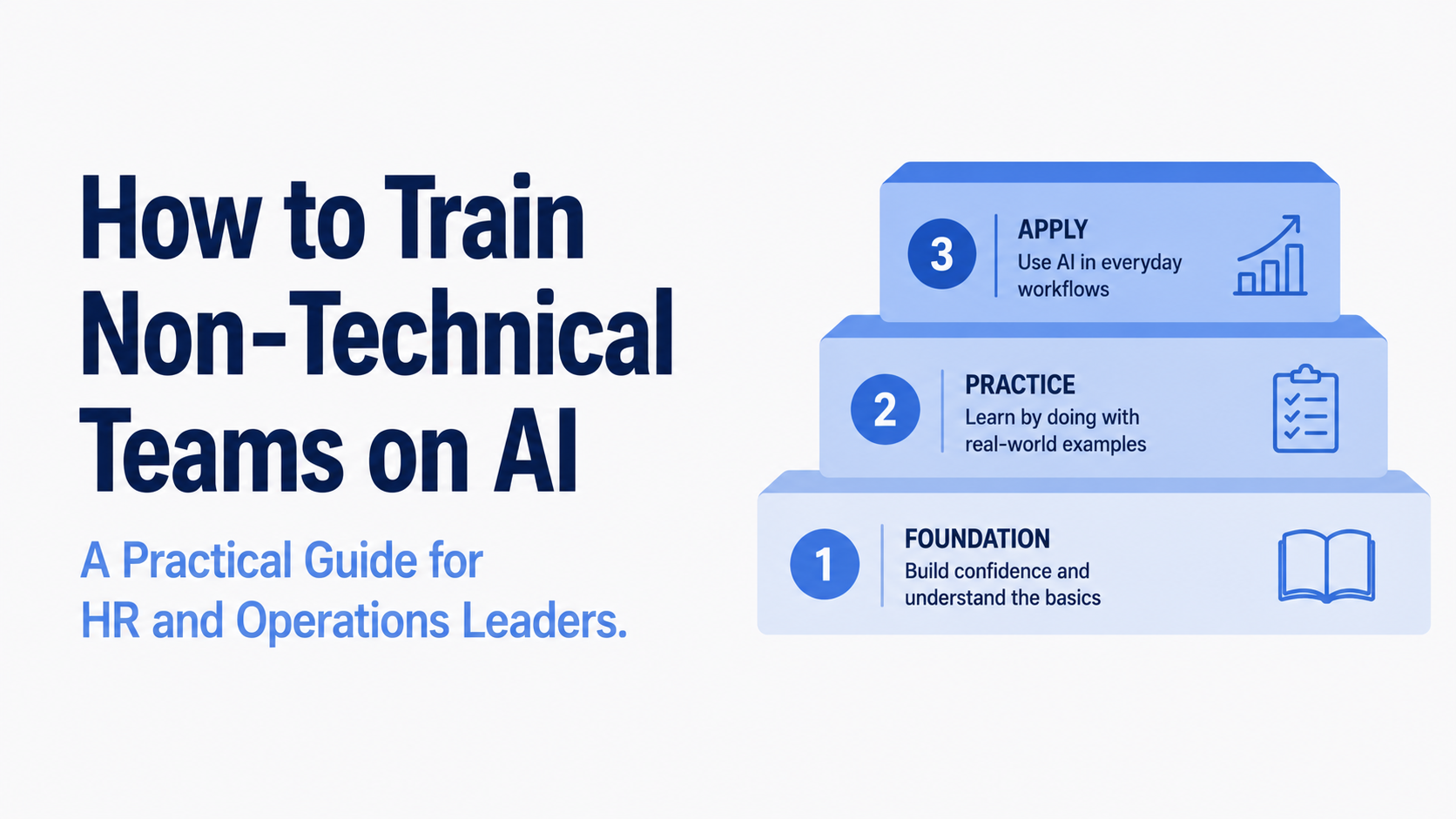

Most internal AI training programs fail for the same reason. They are built around what AI is rather than what it can do for the specific person sitting in front of it. For a non-technical employee, a session on large language models and transformer architecture is not a starting point. It is a reason to disengage before the first break.
Designing AI training that actually changes how employees work requires a different approach, one that starts with relevance and builds from there. This guide walks through a three-tier framework for structuring internal AI training for teams without a technical background, what belongs in each tier, and what to avoid at each stage.
Why Non-Technical Employees Need a Different Approach
The gap between AI training that gets completed and AI training that gets used comes down to one thing: context. Technical employees can often see themselves in a capability and figure out the application. Non-technical employees need the application first. If someone cannot immediately picture how a tool makes their specific job easier, the training does not stick regardless of how well it is delivered.
This is not a learning problem. It is a design problem. The curriculum has to do the translation work, connecting AI capabilities directly to the tasks, decisions, and frustrations of the people going through it. A customer service team member needs different examples than a finance analyst. An HR business partner needs different starting points than a sales representative. Generic AI training treats these as the same audience. Effective AI training does not.
Tier One: Foundation
The first tier has one job: remove the intimidation and establish basic, safe habits. This is not about making employees AI experts. It is about getting them comfortable enough to try.
What belongs here:
Start with use cases employees already care about, not AI in the abstract. A good opening exercise is asking employees to describe a task in their current week that is repetitive, time-consuming, and does not require much judgment. That task is their first AI use case. Working through it together, using a tool like ChatGPT or Claude, makes the technology immediately concrete.
Cover prompting basics in plain language. Employees do not need to understand how prompting works technically. They need to understand that the more context they give, the better the output, and they need practice building that instinct through repetitive hands-on exercises rather than theory.
Establish data handling rules clearly and early. What can and cannot be entered into an AI tool. Which platforms are approved. What to do if they are unsure. These rules should be in writing before any training begins. A foundation tier that skips this step creates habits that conflict with whatever governance policy follows.
What to avoid:
Do not start with what AI is. Start with what it does for them. Do not use jargon without immediate plain-language explanation. Do not make this tier longer than it needs to be. One to two hours of hands-on practice is more effective than a half-day of slides.
Tier Two: Role-Specific Application
Once employees are comfortable with the basics, the training needs to get specific to their role. This is where most programs stop investing, and it is where the real behavior change happens.
What belongs here:
Build sessions around the actual workflows employees use every day. For a marketing team, that might be drafting content briefs, repurposing long-form content into social posts, or synthesizing customer feedback. For an operations team, it might be summarizing lengthy documents, building process documentation, or creating first-draft SOPs. The content should feel like it was written for that team specifically, because it should be.
Introduce AI tools that are integrated into software employees already use. Many people do not realize that the tools they are already in every day, their CRM, their project management platform, their email client, have AI features built in. Starting with these removes the friction of learning a new platform on top of learning a new way of working.
Introduce critical evaluation of AI outputs here. Employees need to build the habit of reviewing what AI produces rather than accepting it directly. Role-specific examples of where AI tends to go wrong in their domain are more memorable than generic warnings about hallucinations.
If your organization is building this second tier and wants hands-on support from people who have done it across different industries, Upscaile specializes in exactly this kind of role-specific AI training for teams. Talk to the Upscaile team.
Tier Three: Advanced Workflows
The third tier is for employees who have moved past basic tool use and are ready to think about how AI can change their workflows more fundamentally. Not everyone needs to reach this tier, but having a pathway for those who do prevents your most enthusiastic adopters from hitting a ceiling.
What belongs here:
Multi-step AI workflows, where the output of one AI task feeds into the next. For example, using AI to summarize a meeting transcript, identify action items, draft follow-up emails, and update a project tracker as a connected sequence rather than separate tasks.
Evaluating and selecting AI tools for specific purposes. Employees at this level can contribute meaningfully to tool decisions and help their teams navigate an increasingly crowded market.
Contributing to internal knowledge sharing. Your tier-three employees are your internal AI champions. Structure this tier to include a component where they document what they have learned, build prompt libraries for their team, and help onboard colleagues in tiers one and two. That peer-to-peer spread tends to produce faster adoption than anything delivered top-down.
What Makes Non-Technical Training Actually Work
A few principles hold across all three tiers.
Short sessions beat long ones. Thirty to sixty minutes of hands-on practice is more effective than a full-day workshop. Employees retain more from repeated short exposures than from a single large block, especially when the skill requires building new habits rather than acquiring new information.
Measure behavior, not completion. Course completion rates tell you very little about whether training is working. More useful signals are whether employees are using approved tools in their day-to-day work, whether they are sharing what they have learned with colleagues, and whether the tasks you designed the training around are actually being done differently. Build those checks into the program from the start.
Keep it updated. AI capabilities change fast enough that training built twelve months ago may already be teaching employees to use tools in ways that have been superseded. Assign someone to review and update the curriculum on a regular cadence, at minimum every six months.
Where to Begin
The most common mistake in building an internal AI training curriculum is trying to cover everything at once. Start with tier one for a single team or department, run it, get feedback, and refine before scaling. A small program that actually changes behavior is worth more than a large program that produces completion certificates.
The right first question is not what should we teach? It is who are we teaching, and what does their work actually look like? Everything else follows from that.
This article is part of our Corporate Upskilling content series. You may also find these useful: How UserTesting Got 70% of Staff Using AI and Scaling AI Literacy: Lessons from Coursera.
Ready to build AI training for your team? Talk to Upscaile about hands-on, role-specific AI training.


.png)
.png)
.png)
.png)
.png)
.png)
.png)
.png)
.png)
.png)
.png)
.png)
.png)
.png)
.png)
.png)
.png)